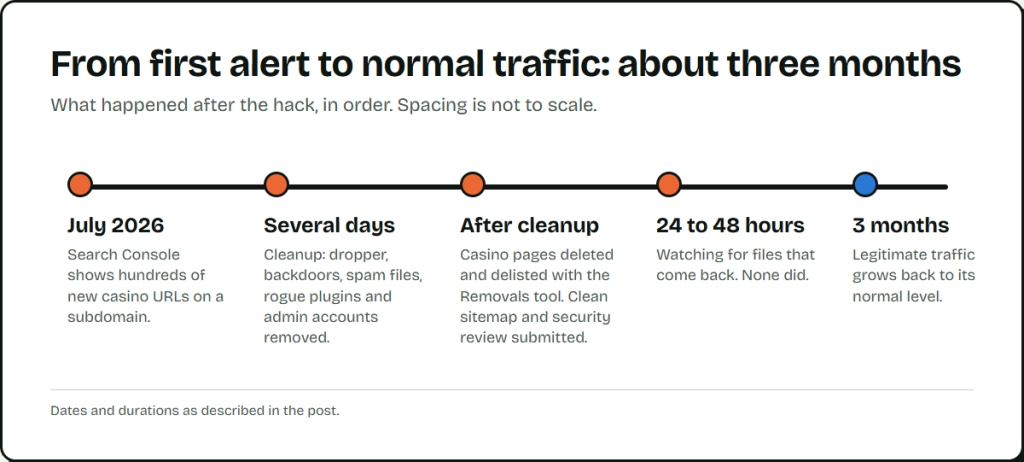
In July 2026, a routine Search Console check turned up hundreds of new URLs on a subdomain that should have had none. The new pages were casino spam. Looking closer, I found the whole site compromised. Visitors were redirected to promotional pages for an online platform, and the main domain showed spam content instead of the client’s pages.
The cleanup took several days because the malware rebuilt itself. The stakes went beyond one site: the client ran several sites on the same hosting account, so a foothold in one threatened all of them. This post covers how the attackers got in, what I found on the server, why deleting files did not work, and how the site’s traffic recovered. I have left out the site’s name and domain.
How it showed up in Search Console
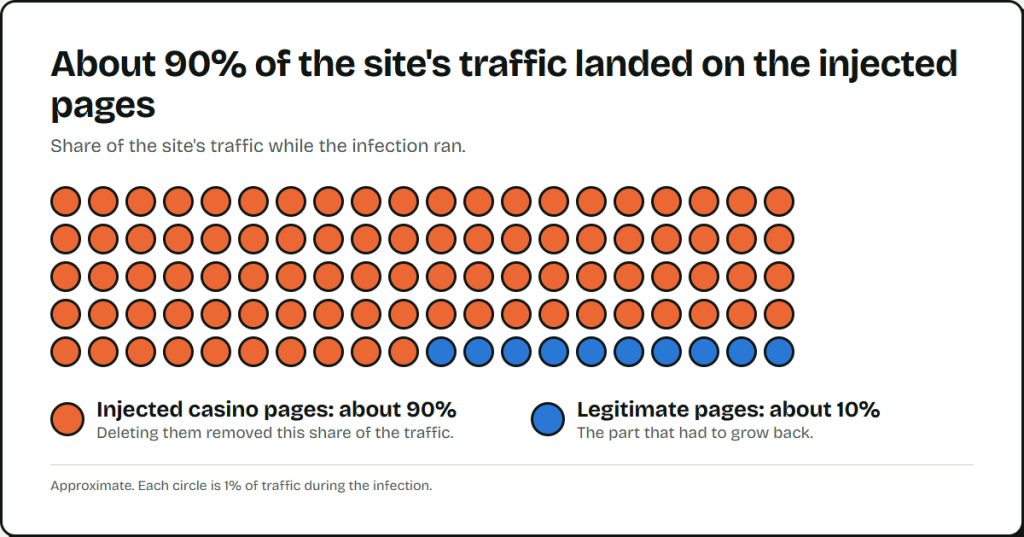
The audit listed hundreds of newly indexed URLs under a subdomain with no reason to publish anything. Then the pattern widened. The attackers kept creating new subdomains, and Google sent a notice for each unauthorized one as it appeared. In the end they replaced the main domain. While the infection ran, about 90% of the site’s traffic landed on the injected pages.
How they got in
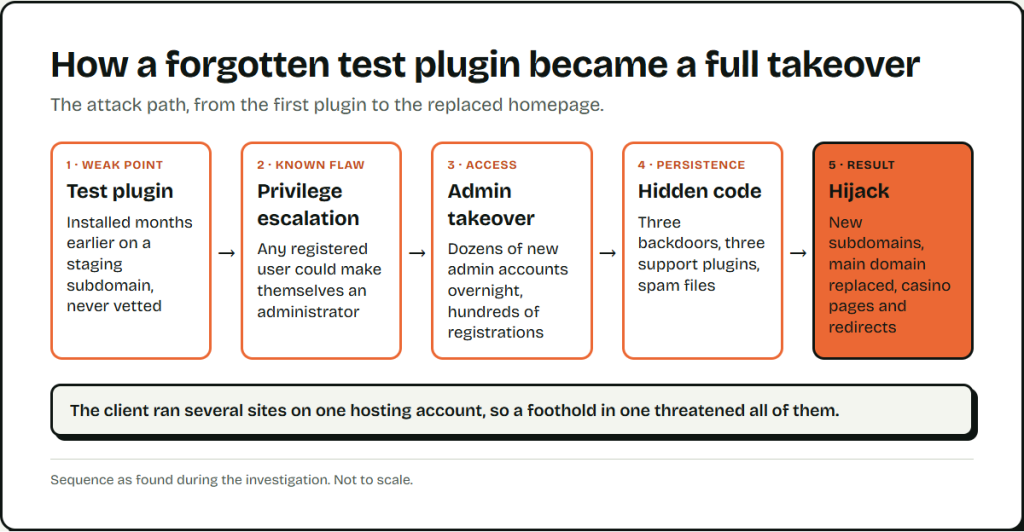
The entry point was a plugin the client had installed months earlier. They had been comparing several plugins with similar features, put a few on a staging subdomain to test them, and moved on to other work. One of those plugins stayed active. Nobody had vetted it, and nobody watched that subdomain.
The plugin had a known privilege escalation flaw. It let authenticated users skip capability checks, so any registered user could make themselves an administrator. The attackers used it, and the site showed two signs:
- Dozens of new administrator accounts appeared overnight.
- Hundreds of new user registrations arrived, likely bots.
The changelog for the plugin’s latest version listed a fix for exactly this type of flaw. Once the attackers had administrator access, they had full control.
What was hiding on the server
I found five kinds of malicious files. Three were backdoors, and one of those rebuilt the others.
| Component and location | What it did |
|---|---|
| Cache backdoor A class in mu-plugins | Looked for a specific cookie, the attacker’s token. If the cookie was valid, it pulled an encrypted payload from the options table, decrypted it with AES-256-GCM using a hardcoded key, and ran it. |
Database drop-inwp-content/db.php | Extended the WordPress database class and ran the same payload on the first query of every page load. |
Dropperwp-content/object-cache.php | Checked that both backdoors still existed and rebuilt any missing one from a base64 copy. It also faked file modification times. |
| Support plugins Plugins folder | A data export tool that could download any content or database table, a fake security plugin that may have watched for cleanup attempts, and a log viewer. |
| Spam files Across the hosting account | Static HTML files. Some replaced real WordPress files (a config.php full of spam HTML), others had random names in odd folders. All served spam. |
The mu-plugins folder loads without activation and shows up only under the Must-Use tab, so most site owners never open it. Drop-in files like db.php and object-cache.php load on every request, before most security plugins run.
Why the usual hack playbook failed
Most SEO professionals know the Japanese keyword hack. It injects spam posts and hidden text, lives in the database, and shows up in the WordPress admin. You delete the spam, change the passwords and ask Google to review the site.
This infection worked differently. The way in was a plugin flaw, not SQL injection or stolen FTP credentials. It replaced the whole site and created subdomains. The code that produced the spam sat in places nobody checks, so deleting the spam changed nothing, and the attacker could come back whenever they wanted.
What did not work
Deleting the visible files. I removed the spam HTML files and the mu-plugins backdoor, and they came back. Server logs showed the files reappearing every day at about the same times. Something was rebuilding them.
Restoring an older backup. The infection was older than the backup, so the restore brought the malware back with it. Scan a backup before you trust it.
Cleaning only the files. At first I missed the encrypted payload in the options table, where it sat as a transient. Until I removed it, the backdoors had something to run.
How I found the dropper
I stopped deleting at random and searched for the strings the backdoors used: class names, function names and the transient name. Those searches led to object-cache.php and the code that rebuilt the other two files. I also checked the drop-in files (object-cache.php, db.php and advanced-cache.php), which few people open.
The dropper has to go first, because it rebuilds whatever you delete. After that I removed:
- the
mu-pluginsbackdoor and thedb.phpbackdoor - all the spam HTML files
- the fake security plugin, the data export tool and the log viewer
- every unauthorized administrator account
- the encrypted transient in the options table
I also deleted the infected subdomain, which removed the entry point. Wordfence flagged malicious patterns and helped confirm the cleanup.
After the cleanup I updated every remaining plugin, changed all passwords (WordPress, database, hosting and FTP), turned on two-factor authentication, enabled a web application firewall and set up file integrity monitoring.
Getting the spam out of Google and the traffic back
On the search side I did five things:
- Deleted the injected casino pages, then asked Google to drop the URLs with Search Console’s Removals tool and submitted a clean XML sitemap.
- Requested a Google security review to clear the “This site may be hacked” warning from search results.
- Watched the site for 24 to 48 hours to confirm that no files came back.
- Contacted sites that linked to the client to tell them the site was clean again.
- Kept updating fresh content to rebuild trust with search engines.
I also used Rank Math to mark the hacked casino URLs as permanently deleted, with a 410 response instead of a 404. A 410 says the page is gone for good, and it can speed up removal from the index. If you control the response code for removed spam URLs, do the same.
Deleting the casino pages removed that 90%. The legitimate traffic grew back slowly, and it took three months to reach its normal level again.
What to check on your own site
- Every plugin on every subdomain and staging site, active or not. Delete the ones you are not using.
- Every other site on the same hosting account. A breach on one puts all of them at risk.
- The Must-Use tab under Plugins, plus
db.php,object-cache.phpandadvanced-cache.phpinwp-content, for files you did not put there. - The options table, for transients you do not recognize.
- The administrator list and recent registrations, for accounts you do not know.
- File change alerts. If files return after you delete them, search for the code that recreates them.
- Plugin updates that mention security fixes. Apply them the day they ship.
The way in was a test plugin on a quiet subdomain. Removing it after the test, or updating it, would have stopped the attack.
Leave a Reply