Short answer: use a password if your tools allow it. If they do not, use noindex and leave robots.txt open so Google can read it. Then add a check after every push, because a staging setting that reaches production can hide your live site.
If Google has indexed your WordPress staging site, your worry is justified: anyone can find those pages in search. I found this on a WordPress plugin site where a staging host was public and indexed, with 406 impressions in 90 days and about 10% of the crawl.
noindex means do not list this page. Disallow in robots.txt means do not fetch this page.
Key takeaways
- Find out whether staging is indexed and how much crawl it takes before you change anything.
- Use a password if your tools allow it. If not, set noindex and confirm it on a live response.
- Leave robots.txt open until the pages drop out, and consider a Removals request for speed.
- Check the production robots meta tag and robots.txt after every push.
- Remember every install on the staging host, including a blog installed in a folder.
What you’ll need
- Search Console access to the staging host
- A way to view page source
Check whether you have a problem
- Search Console: filter the performance report by the staging host’s URLs. Any impressions mean it is indexed.
- Crawl Stats: look at the share of requests that go to the staging host.
- View the page source on staging and look for
index, followor no robots tag at all. - Check whether staging has canonical tags pointing at itself. That tells Google it is a page in its own right.
The three options
| Option | What it does | When to use it |
|---|---|---|
| Password (HTTP auth) | Nobody, including Google, can see the pages | Best default, if your tools can get past it |
| noindex | Google can see the page but is told not to list it | When tools or colleagues need open access |
| robots.txt Disallow | Asks crawlers not to request pages | Not as a fix for pages already indexed |
Why a Disallow in robots.txt backfires
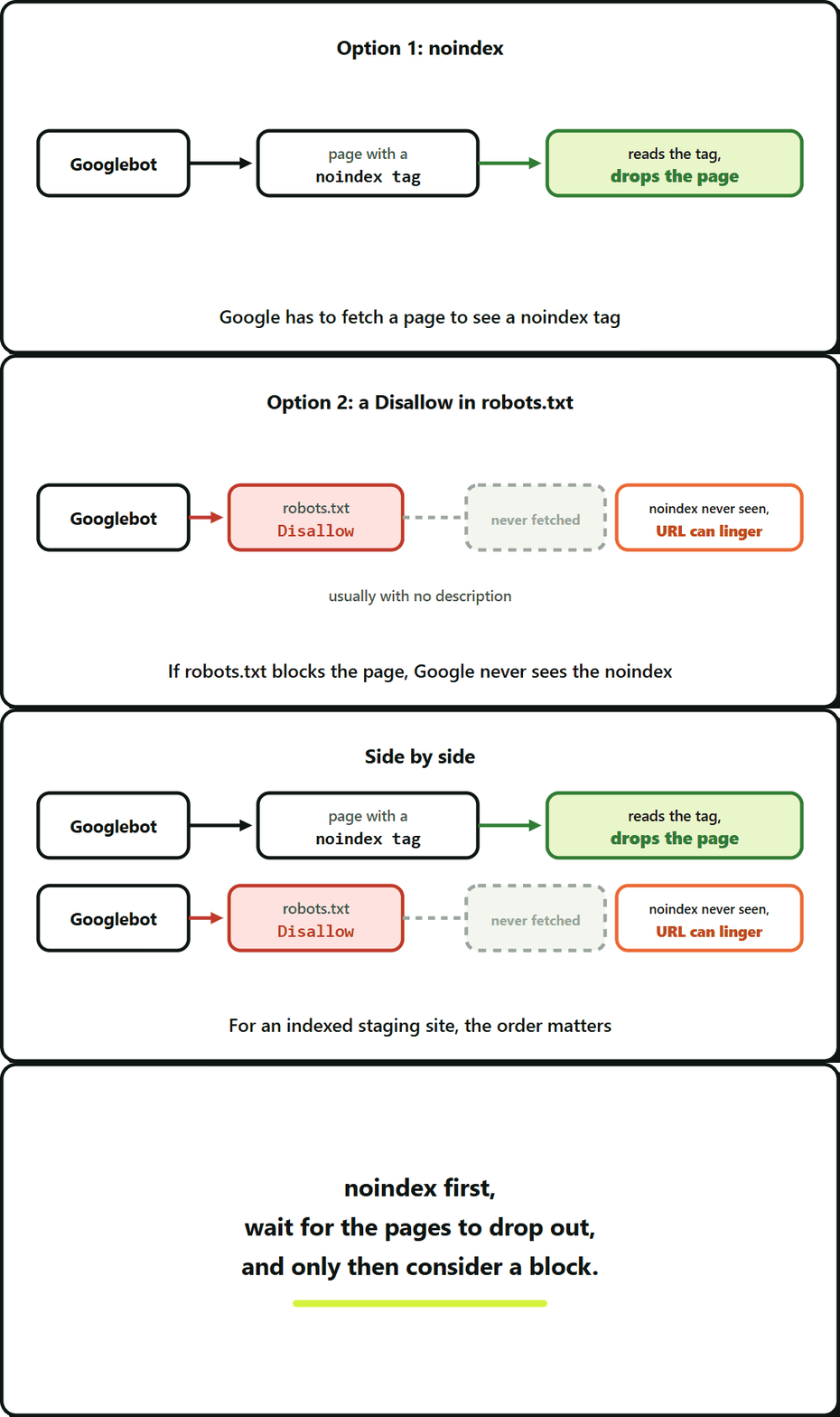
Google has to fetch a page to see a noindex tag on it. If robots.txt blocks the page, Google never sees the noindex. URLs that are already known can stay in the index, usually with no description.
So for a staging site that is already indexed, the order matters: noindex first, wait for the pages to drop out, and only then consider a block.
Check what your robots.txt actually returns after you turn on a “discourage search engines” setting. Some setups add a blanket Disallow: / along with the noindex. If yours does, you have the problem above.
What I did when a password was not possible
The team’s tooling needed access to staging, so I could not add a login. I used the CMS setting that asks search engines not to index the site, then checked a live response for noindex, nofollow. I did not touch robots.txt.
Do not trust the toggle. Fetch the page and read the tag.
Getting the pages out faster
noindex works as Google recrawls, which can take a while. You can also file a request in the Search Console Removals tool. Treat that as temporary hiding while noindex does the permanent work.
The push that ruins production
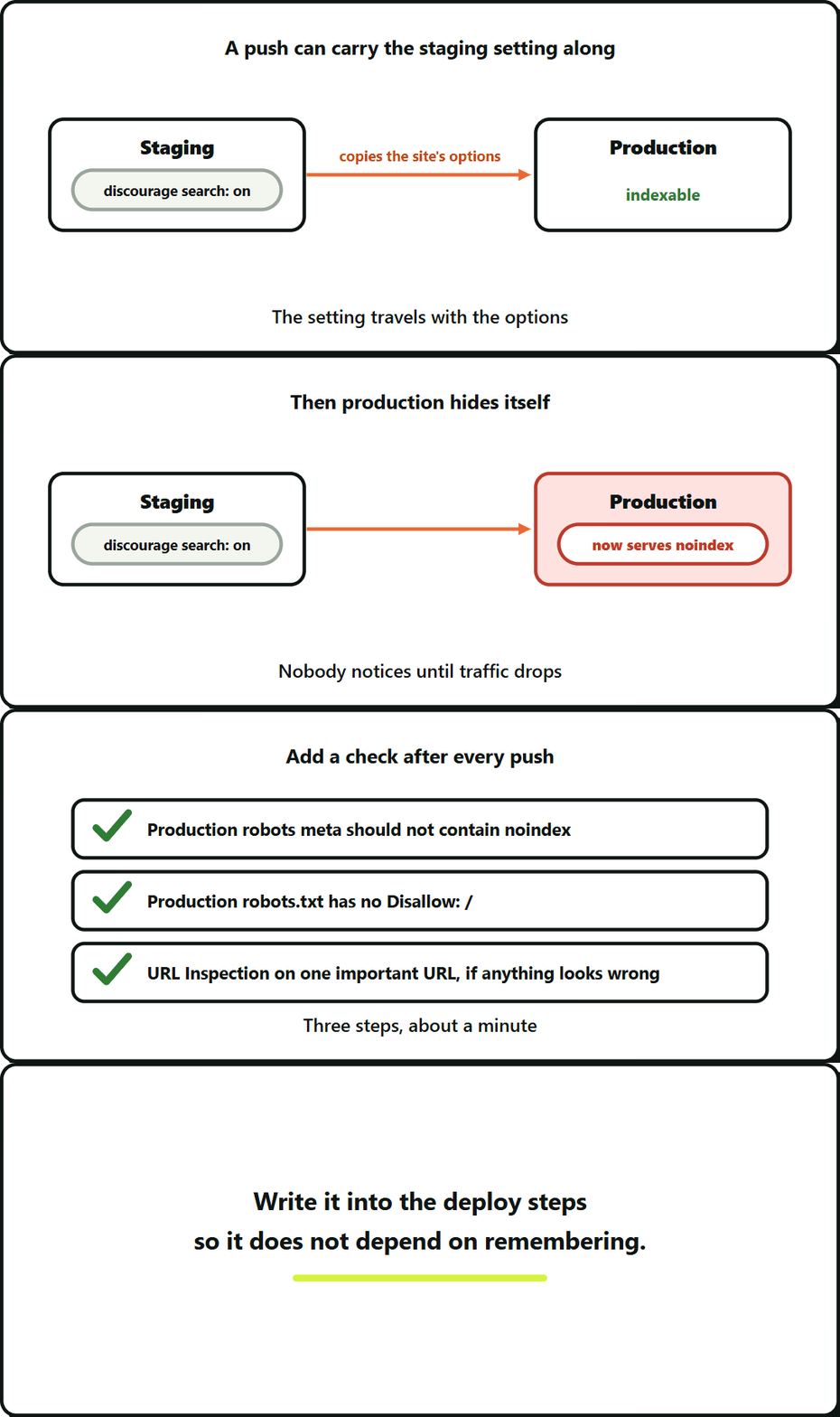
This is the part that is easy to miss. If you push from staging to production in a way that copies the site’s options, the “discourage search engines” setting can go with it. Production then serves noindex, and nobody notices until traffic drops.
Add a check after every push:
- Fetch the production home page and read the robots meta tag. It should not contain
noindex. - Fetch production robots.txt and confirm it has no
Disallow: /. - Check one important URL in the Search Console URL Inspection tool if anything looks wrong.
It takes a minute. Write it into the deploy steps so it does not depend on remembering.
Frequently Asked Questions About Staging Site Indexing
A password is the strongest option if your tools can get past it. If they cannot, set noindex and confirm it in a live response. The table of the three options above shows which fits.
How do I stop a staging site from being indexed by Google?
Google can only obey a noindex it is able to read. A Disallow stops it fetching the page, so URLs it already knows can linger in results. Put noindex in place first and block later, if at all.
Why shouldn’t I block an indexed staging site in robots.txt?
Set noindex and wait for Google to recrawl. For something quicker, the Search Console Removals tool can hide the pages for a while, as the section on getting pages out faster describes.
How do I get staging pages out of Google faster?
Yes. With HTTP authentication nobody, Google included, can see the pages, which is why it is the best default. The catch is that your own tools and colleagues need access too. If they cannot work behind a login, use noindex.
Leave a Reply